

Crusado Mobile Login: Biometric and Fast Entry
Contents
How to Set Up Biometric Login on Crusado Mobile
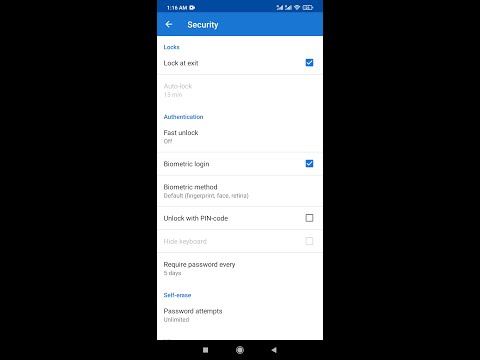
Setting up biometric login for the Crusado casino app is a straightforward process that takes less than two minutes. First, ensure you have a registered account and are logged in via your traditional username and password. Navigate to the ‘My Account’ or ‘Security’ section within the app. Here, you will find an option labeled ‘Enable Biometric Login’, ‘Fingerprint/Face ID’, or something similar. Toggle this setting on. Your device will immediately prompt you to authenticate using your stored fingerprint or facial scan. Once confirmed, the setup is complete. The next time you open the app, it will default to requesting biometric data instead of a password, allowing for a near-instantaneous entry.
Comparing Login Methods: Speed and Security
While biometrics offer the fastest entry, it’s useful to understand how it compares to other methods. A traditional password login typically takes 15-20 seconds, depending on typing speed and the need for potential password retrieval. A PIN code is slightly faster, at around 10 seconds. Biometric authentication, however, reduces this process to under 3 seconds from app launch to being fully logged in. From a security perspective, biometric data is unique to the user and not stored on Crusado’s servers but rather encrypted on your device itself. This makes it significantly more secure against remote hacking attempts than a static password, which can be phished or brute-forced.
Troubleshooting Common Biometric Login Issues
Even the most reliable technology can sometimes falter. If you’re experiencing issues with your Crusado mobile biometric login, here are the most common fixes:
- Check App Permissions: Ensure the Crusado app has permission to use your device’s biometric sensors in your phone’s settings.
- Re-register Your Biometrics: Sometimes, re-adding your fingerprint or face scan to your device’s system settings can resolve recognition errors.
- Clear App Cache: A corrupted cache can cause functionality issues. Clearing it via your phone’s application settings often helps.
- Update the App: Ensure you are running the latest version of the Crusado app, as updates frequently contain bug fixes for login features.
- Check for OS Updates: An outdated mobile operating system can cause compatibility problems with the app’s security features.
If problems persist, you can always fall back on your password to access your account and contact support.
Linking Fast Login to Bonuses and Promotions
Using the fast biometric login can directly enhance your experience with Crusado bonus offers. Many promotions, especially time-sensitive ones like a Crusado no deposit offer or Crusado free spins, require quick action to claim. A slow login process could mean missing out. By enabling biometrics, you ensure you can enter the casino instantly and secure these limited-time deals before they expire. Furthermore, when entering a Crusado promo code, the process is smoother and faster from within the app, making it easier to activate your rewards without friction.
Security Protocols and Data Privacy
Crusado employs robust security measures to protect your data. The biometric information itself is never transmitted or stored on their servers. Instead, the authentication process uses a token-based system. When you scan your fingerprint or face, your device’s secure enclave verifies it and sends a unique, encrypted approval token to the Crusado app. This means the casino only receives a confirmation of identity, not your actual biometric data. This approach, combined with standard SSL encryption for all data transmission, ensures that your personal and financial details remain secure while you enjoy the convenience of one-tap entry.
| Login Method | Average Time | Security Level | Best For |
|---|---|---|---|
| Biometric (Face/Fingerprint) | 2-3 seconds | Very High | Fast, secure access on personal devices |
| PIN Code | 8-10 seconds | High | Quick access without biometric hardware |
| Password | 15-20 seconds | Medium (user-dependent) | Initial setup or accessing from shared devices |
For any further questions regarding your account security, you can always reach out to the support team at Crusado for assistance.
Comments are closed.